Smart fridges add connectivity and features beyond cooling: cameras, touchscreens, apps, and sometimes voice control. This guide summarizes the benefits and who they are for.
What Smart Fridges Offer
Smart refrigerators connect to Wi-Fi and pair with manufacturer apps. They may include interior cameras, touchscreens on the door, voice control, and integration with smart home systems. The core cooling function is the same as a standard refrigerator—the U.S. Department of Energy (DOE) sets efficiency standards for all refrigerators regardless of smart features. ENERGY STAR certifies efficient models. The difference is the added connectivity and convenience features.
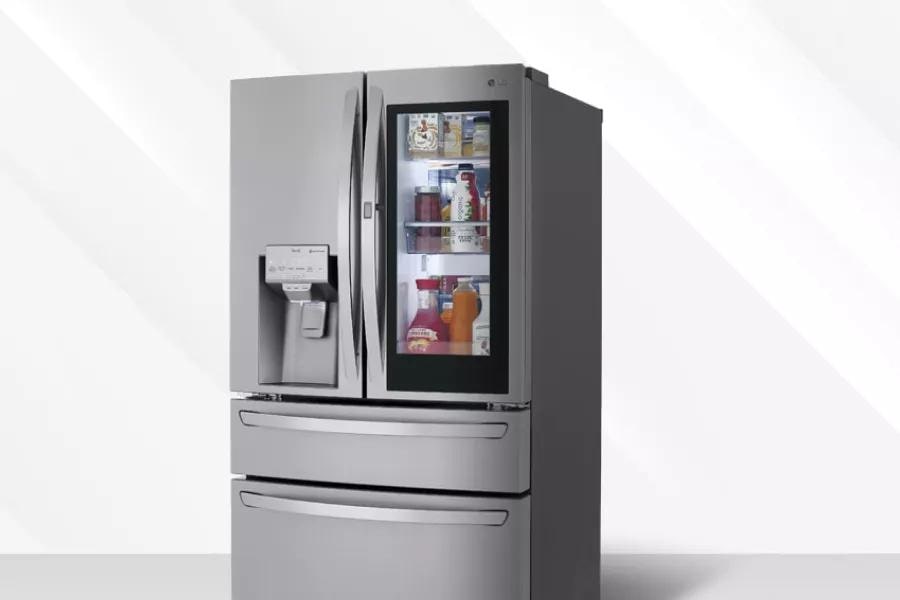
Interior cameras are one of the most practical smart features. They let you see what is inside without opening the door. Some models take a photo each time the door closes, so you have an up-to-date view. Others stream live video to your phone. The camera reduces the need to open the door to check contents, which can lower energy use and help maintain temperature.
Interior cameras let you see what is inside without opening the door—handy for quick checks and shopping lists. Touchscreens on the door can display recipes, calendars, and notes. You can add items to a grocery list from the fridge or pull up a recipe while cooking. These features save steps and can reduce door openings.
Every door opening lets cold air out and warm air in. The U.S. Department of Energy (DOE) notes that minimizing door openings can reduce energy use. A camera that shows the contents reduces the need to open the door to check what you have. That can lower electricity use and help maintain temperature.
Food waste is a concern. The U.S. Environmental Protection Agency reports that food is the largest category of material in municipal solid waste. Seeing what is inside before you shop helps you use what you have and avoid buying duplicates. Some smart fridges integrate with shopping list apps to streamline the process.
Touchscreens on the door can display recipes, calendars, notes, and weather. You can add items to a grocery list from the fridge or pull up a recipe while cooking. Some models let you leave notes for family members or sync with shared calendars. The usefulness depends on how often you use these features and whether the interface stays responsive over time.
Wi-Fi and apps let you adjust temperature, switch modes (e.g. vacation), or get alerts if the door is left open or a problem is detected. Some models run diagnostics and can notify you when a filter or service is needed. That can prevent food loss and catch issues early.
Vacation mode reduces energy use when you are away. You can switch to it from the app when you leave and switch back when you return. That avoids having to remember to adjust the dial manually. The freezer stays cold for food safety; the refrigerator section may run slightly warmer to save electricity.
Door-left-open alerts are practical. A notification can prevent a full thaw and food loss. The USDA advises that a refrigerator keeps food safe for about 4 hours if the door stays closed during a power outage; an open door accelerates warming. Catching the problem early can save your food.
Some models run self-diagnostics and can notify you when a filter needs replacement or when a service may be needed. That can help you maintain the unit and catch issues before they cause a failure. Not all smart fridges have the same level of diagnostic capability; check the manufacturer's feature list.
Integration with Home and Voice
Smart fridges may work with voice assistants and smart home systems. You can ask for a recipe, add items to a list by voice, or check the fridge status from another device. Integration depends on the brand and platform; check compatibility before you buy.
Voice control can be convenient when your hands are full—adding an item to the shopping list while carrying groceries, or asking for a recipe while prepping. Integration with Amazon Alexa, Google Assistant, or Apple HomeKit varies by model. Check which platforms are supported and whether the features you want are available.
Smart home integration is evolving. Some fridges can work with other connected devices—for example, turning on a kitchen light when the door opens. The usefulness depends on your existing smart home setup and preferences.
Compatibility varies by brand. Samsung, LG, and other manufacturers each have their own ecosystems. Check which voice assistants and smart home platforms are supported before you buy. If you use Amazon Alexa, ensure the fridge works with Alexa. The same applies to Google Assistant and Apple HomeKit.
Smart fridges cost more than comparable non-smart models. They rely on Wi-Fi, manufacturer apps, and ongoing software support. If the app is discontinued or the platform changes, some features may stop working. Cooling still works without connectivity. Weigh the benefits against cost and dependence on technology.
Smart features add $500 to $1,500 or more to the purchase price. The premium pays for cameras, touchscreens, Wi-Fi, and software. For some households, the convenience is worth it. For others, a standard ENERGY STAR refrigerator delivers the cooling they need at lower cost.
Technology dependence is a risk. Manufacturer apps can be discontinued; platforms can change. The refrigerator will still cool without connectivity, but the smart features you paid for could become obsolete. Consider the manufacturer's track record with software support and whether you are comfortable with that dependence.
Privacy is another consideration. Cameras and microphones (for voice control) collect data. Review the manufacturer's privacy policy to understand how data is used and stored. Some users prefer to disable cameras or voice features if they are concerned about data collection.
Smart refrigerators must meet the same U.S. Department of Energy (DOE) efficiency standards as standard models. ENERGY STAR certifies units that exceed the criteria. Smart features add a small amount to energy use, but the interior camera that reduces door openings may offset that. The U.S. Energy Information Administration (EIA) reports that refrigeration accounts for a share of residential electricity use. Choose an ENERGY STAR model regardless of smart features—the cooling system is what drives most of the cost. The yellow EnergyGuide label shows estimated yearly kWh.
The DOE notes that minimizing door openings can reduce energy use. A camera that shows contents without opening the door can help. At typical EIA electricity rates, a 20-cubic-foot refrigerator might use 400 to 600 kWh per year. Smart features may add 10 to 50 kWh for the display and connectivity, but reduced door openings could save a similar amount. The net effect varies by usage.
Smart fridges suit tech-savvy households that value connectivity. The camera helps with meal planning and reducing food waste—the U.S. Environmental Protection Agency notes that food is the largest category in municipal solid waste. Remote alerts can prevent food loss from a door left open. If you prefer simplicity and lower cost, a standard ENERGY STAR refrigerator delivers reliable cooling. The choice depends on your priorities.
Households that meal plan, shop frequently, or have multiple people using the fridge may benefit from the camera and shopping list features. Busy families can check contents from the grocery store and avoid buying duplicates. People who travel may value vacation mode and remote monitoring. If you rarely use apps or smart home features, a standard refrigerator may be the better value.
Capacity and Placement
Smart fridges come in the same sizes as standard refrigerators—compact, apartment-size, and full-size. Capacity ranges from 10 to 28+ cubic feet. The USDA recommends 40°F or below for the refrigerator and 0°F or below for the freezer. Smart features do not change capacity or temperature performance. Choose by layout, capacity, and features.
Placement and ventilation requirements are the same as standard refrigerators. Leave clearance at the back and sides per the manual. Ensure the unit has a stable Wi-Fi connection if you want to use smart features. A weak signal can cause the app to lag or disconnect. Some features work locally without internet; others require connectivity.
Benefits of smart fridges include seeing inside via camera, controlling and monitoring from an app, using touchscreen and voice, and receiving alerts. The camera can reduce door openings and help with meal planning. Remote alerts can prevent food loss. Smart fridges cost more and depend on technology that may change over time. Best for people who want connectivity and are okay with higher cost and tech dependence. The DOE sets efficiency standards; ENERGY STAR certifies efficient models. For more help comparing smart and standard refrigerators, browse models and current prices.
Frequently Asked Questions
See inside via camera, control from app, use touchscreen and voice, get alerts for door open or issues.